Say it your way.
One-to-one conversations and group chats. Share photos and videos, or hold to talk when a voice says more.
TextPhotos & videoPush-to-talk
 meshchat
 / A MESHCHAT PRODUCT
ChatABit is an end-to-end encrypted mesh messenger by MeshChat. Send text, photos and voice over available Bluetooth and local Wi-Fi links—even without internet or cell service.
01 / PEOPLE MAKE THE NETWORK
A mesh messenger lets participating devices connect directly and relay messages for one another. ChatABit uses available Bluetooth and local network connections to carry encrypted conversations along those paths.
Connection depends on compatible devices, permissions and available links. Range varies with hardware and surroundings.
Mesh vs internet messaging ↗Bluetooth or a shared local Wi-Fi network connects nearby phones. Your conversation stays end-to-end encrypted.
02 / MORE THAN A MESSAGE
For the weekend crew, the local community,
and the people you want to keep close.
One-to-one conversations and group chats. Share photos and videos, or hold to talk when a voice says more.
The mesh chooses between available links and can switch when one drops. Bluetooth, Wi-Fi and Apple peer-to-peer work together.
Explore the connections ↗Store-and-forward lets participating phones carry encrypted messages between disconnected groups as people move.
Delivery may resume when a path becomes available; retention is limited.A LOOK INSIDE CHATABIT
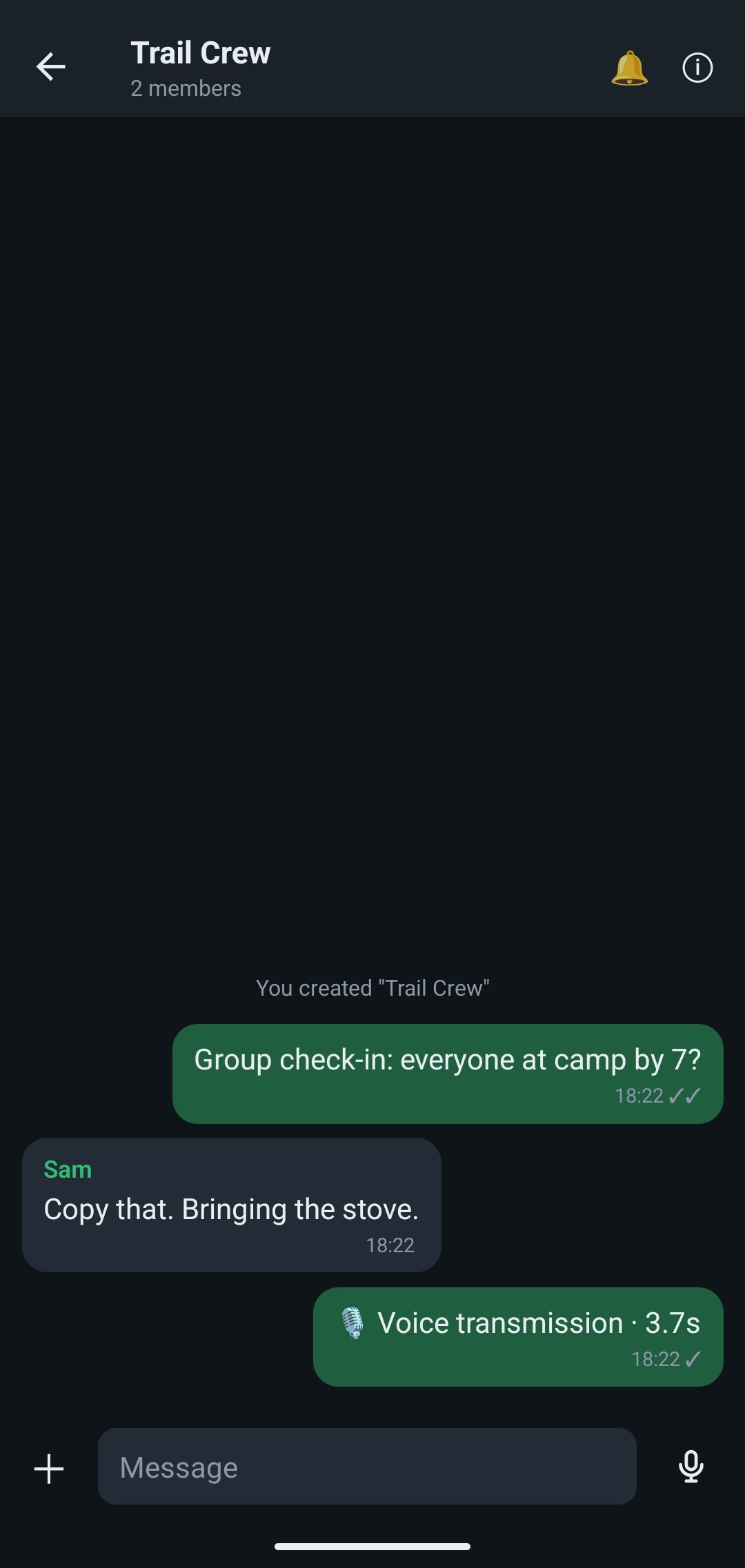
Android captures from the marketing kit.
Your people, your groups, your preferences.
Push-to-talk needs an active connection. Screen shows a received voice transmission in a group thread.
Open the dedicated walkie-talkie view for a large hold-to-talk button, who’s speaking, and recent transmissions.
The screenshots above show the chat view.MORE WAYS TO BE UNDERSTOOD
A readable companion to your voice.
An app that feels familiar in your language.
On supported phones, ChatABit can turn your push-to-talk transmission into text and send it with the conversation. People can receive the words even if they missed the live audio.
Recognition runs on the sender’s phone. Control it in Settings with “Send text with my voice messages.”
Availability depends on the device, language model and permissions. Android transcription requires Android 13 or later and on-device recognition. iPhone requires supported on-device recognition.Follow your phone’s language or choose one in the app: English, Spanish, Brazilian Portuguese, French, Hindi, Indonesian, Russian or Ukrainian.
MADE FOR YOUR KIND OF TOGETHER
Start with a group and the phones you carry.
Build the connection around your day.
Share a check-in, a photo, or a quick voice update with friends around camp.
Coordinate nearby teammates when cellular service is congested. Group chat and push-to-talk keep the conversation together.
Connect a small team over site Wi-Fi. Add a laptop or Raspberry Pi relay, or compatible HaLow gateways for your network layout.
Range depends on devices, obstacles and available links. For remote trips, plan separate access to emergency communications.
YOUR FIRST CONVERSATION
Once available, install ChatABit on both phones, open ChatABit, and choose a display name. No account or phone number needed.
Allow nearby-device and local-network access. Start on the same Wi-Fi network or enable Bluetooth. Keep both apps open.
Open People nearby and start a chat. Send a message, create a group, or allow microphone access and hold to talk.
On Android, one phone can create a local network from Connection; others scan its code to join. On iPhone, nearby Bluetooth and Apple peer-to-peer are also available. iPhone works best with the app open.
TRUST STARTS WITH TRANSPARENCY
Messages are encrypted between participants. Devices that relay them can carry the conversation without reading its content.
Identity that starts on your device.No phone number or account required. Verify contacts with QR codes and safety numbers.
Protection at more than one layer.End-to-end message encryption, encrypted device links, and signed message envelopes.
Group membership means something.Group keys rotate when a member is removed or leaves.
BUILT FOR THE LINKS YOU HAVE
Start with the devices around you. Extend with compatible network hardware as your setup grows.
A FEW GOOD QUESTIONS
No. ChatABit creates identity keys on your device. Choose a display name and connect with nearby people; you can verify contacts using QR codes and safety numbers.
There is no guaranteed distance. Range depends on the phones, obstacles, radio conditions and available relays. Multiple hops can extend an available path, but they do not guarantee delivery. ChatABit does not add satellite or long-range radio hardware to a phone.
Yes. ChatABit can send messages over available Bluetooth and local Wi-Fi links without internet or cell service. Both people still need a direct connection, a path through participating devices, or a later store-and-forward opportunity. Stored messages have a limited retention window; delivery is not guaranteed. Live push-to-talk needs an active path. Compare mesh and internet messaging.
ChatABit end-to-end encryption protects direct and group message content between participants. Relays forward that content without reading it, but can see routing headers such as sender and recipient identifiers. Discovery can reveal nearby devices; traffic sizes and timing remain observable. Encryption does not make ChatABit anonymous. Read the security model and its limits.
ChatABit direct messages use rotating prekeys with secret retention of up to 14 days, rather than a per-message Double Ratchet. Initial or fallback messages may use static keys until a valid prekey is available. This model does not provide post-compromise healing. ChatABit group keys rotate when a member leaves or is removed; device links use ephemeral keys.
ChatABit is planned for Google Play and the App Store. It is not available from the stores yet. Download links will appear here when it launches; release dates and pricing will be announced.
ChatABit can use HaLow through compatible IP network equipment; the app does not add a HaLow radio to a phone. LoRa and satellite need additional hardware and transport implementations. Private internet relay hosting is coming soon; an available public relay service is not established. Local mesh messaging does not depend on that planned service.
ChatABit can include an automatic transcript when the sender enables voice-to-text on a supported phone. Recognition happens on the sender’s device, and the text travels through the encrypted conversation. Transcripts can contain errors. A supported speech model and permissions are needed; downloading a model may require internet. Phones without transcription can still receive transcripts.
You can delete a voice message for yourself, or request deletion of your own voice message for everyone. Recipients need to receive that request. Deletion cannot undo what someone has already heard or remove copies they made outside ChatABit.
ChatABit has a documented design target of roughly 50–100 nodes, not a measured capacity guarantee. Delivery depends on participating devices, available paths, radio conditions and operating-system background limits. Adding phones only helps reach another group if they create a usable route or carry stored messages across a gap.
YOUR NEXT CONNECTION
ChatABit is coming to Google Play and the App Store.
A familiar way to get a different kind of messenger.
Get ready for private group chats, photos and push-to-talk on your Android phone.
Bring ChatABit along on your iPhone. Connect with nearby people over available Bluetooth and Wi-Fi links.
Store links will appear here when ChatABit launches. Release dates and pricing will be announced. iPhone works best with the app open.
MEET YOUR NEXT CONNECTION
Your next group conversation could travel phone to phone.
Discover what it means to make your own connections.
Coming to Google Play & the App Store